
Alright, I get it…We all love free stuff, especially when it’s a free password manager that makes logging in convenient without even asking for a credit card. But you have to remember the one constant thing in the digital world, which is that it always keeps changing. This means that having a free tool with barely any advanced security is a bad idea in a world where data breaches are becoming more common than ever.
Today, we will look at why it’s worth upgrading from a free password manager to a paid one.
I Understand the Appeal of Free Tools
Note: For those who don’t know, password managers make logging in convenient by automatically filling in your username and password.
You should know that completely free tools are built to do the bare minimum and may often leave out critical safety features such as proactive breach monitoring and dark web alerts. Another issue you might deal with is the unavailability of cross-device sync. Many free password managers often store the passwords on your device. This means that when you save a password on your laptop, it will stay on that device and won’t sync with your phone.
Note: Getting paid password managers is non-negotiable when you’re running a small business, enterprise, or a startup.
Key Points to Note:
- People(especially Gen Z) need to know that free security tools come with their own drawbacks.
- Investing in a paid tool is essential, especially when you’re dealing with sensitive data such as passwords.
- In what situation would using a notebook to store passwords work?: If you are an individual who barely uses social media and only uses essential apps.
Keeper Security vs Free Password Managers
The following are some of the differences between Keeper Security password manager:
| Feature | Keeper Security(Password Manager) | Other Free Password Managers |
| Autofill Password | Available | Generally Available |
| BreachWatch | Exclusively Available on Keeper Security What is it?- BreachWatch is a dedicated dark web monitoring tool available on the Keeper Security platform Note: It’s a premium add-on feature | Not Available |
| Password generation | Available | Generally Available |
| Cross-device Synchronization | Yes | Not available on all free tools |
| Quantum-resistant Encryption | Available Purpose: To protect your data against future quantum threats. | Not that common yet |
| Biometric Logins | Available | Not that common |
Drawbacks of Free Password Managers: They limit access to critical features such as dark web breach monitoring and priority support. Often, many free tiers only allow you to sync passwords to only 1 device type; on the other hand, some don’t even offer that.
It’s understandable if a person who has never used a password manager ignores these. But it is important not to ignore these things and get a paid password manager when you’re running an organisation.
How Does Keeper Security Stand Out?:
- You can easily approve logins from your smartwatch.
- Conduct centralised authentication by connecting Keeper to your LDAP.
- Features biometric logins with Touch ID, Face ID, and Windows Hello.
- Features Entra ID (Azure) integration: Makes it easy to manage users and enforce enterprise policies.
Main Takeaways:
- Where does Keeper password manager stand out?: Easy to use with advanced reporting features.
- Keeper Password Manager features cross-device synchronization.
- Always check if they have any active promotions such as coupons or deals.
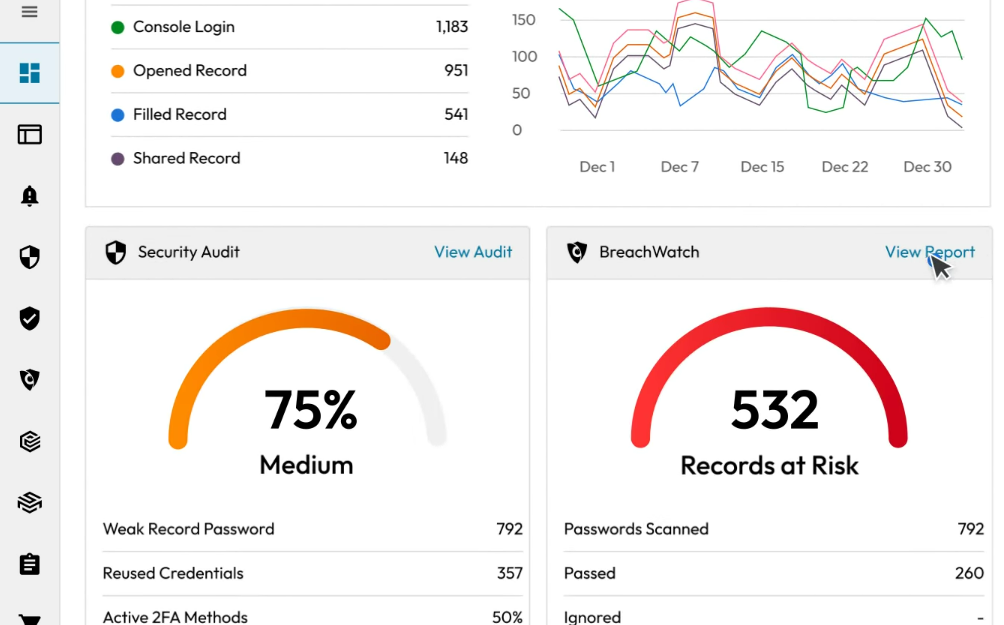
- The BreachWatch feature scans the internet and public data breach lists for leaked passwords from your Keeper Vault.
Let’s Talk About the Pricing
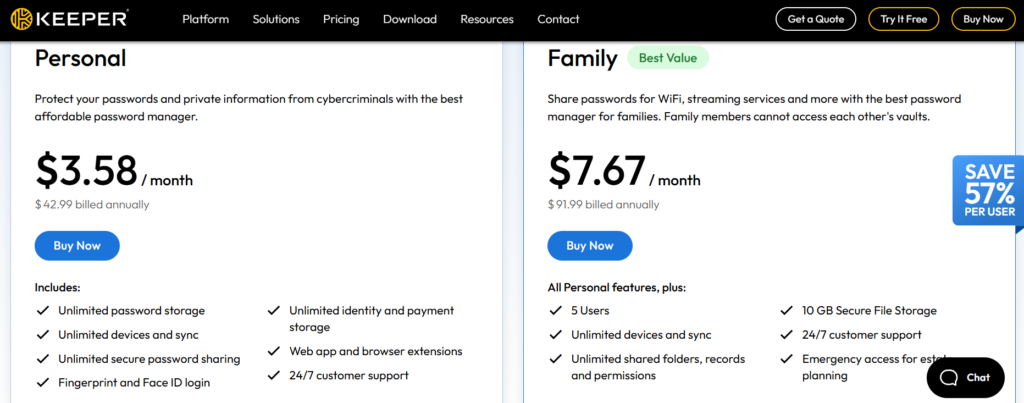
Pricing for Individuals & Family:(Annual Billing)
- Personal plan: $3.58/month
- Family plan: $7.67/month
Note: The BreachWatch feature is available at $26.99/year. Other popular add-ons include Secure File Storage and Concierge Service. The Secure File Storage feature starts at $13.99/year. You can save your private files and photos in your Keeper Vault.
Pricing for Businesses:
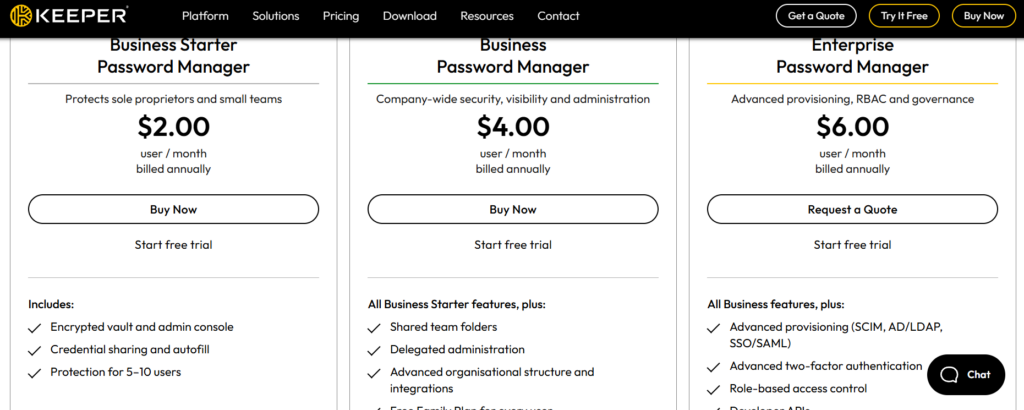
- Business Starter Password Manager: $2/user/month… great for small teams
- Business Password Manager: $4/user/month… features shared team folders
- Enterprise Password Manager: $6/user/month… suited for larger companies with more employees.
Main Highlights:
- The Keeper Vault is secure and encrypted digital storage provided by Keeper Security.
- Getting the business plans would be a better idea if you have a company with large teams. The Enterprise Password Manager plan is the only option if you’re looking for role-based access control. Thankfully, it is priced at just $6/month(annual billing).
- The Business Starter Password Manager plan, priced at $2/month, would be enough for startups and small businesses.
- Do the Business plans offer free trials? Yes!
Storing Passwords Manually: A Big No-No
DO NOT EVEN THINK OF USING A NOTEBOOK!: With all this talk about free vs paid password managers, I still hear many people talking about using a physical notebook to store passwords. You’ll find a lot of threads discussing this on platforms such as Reddit. I agree that using a notebook might seem like a good idea at first, but believe me, it won’t be long before you lose track of where you wrote a particular password.
Pro Tip: Never EVER write down your crypto wallet private keys on paper. I made this mistake in the past, so I’d strongly recommend against it. You’re better off with Keeper Password Manager.
Key Highlights:
- I once filled almost my entire diary with all of my passwords. Even with all the sticky page markers, finding even a single password was still a huge headache.
- Keeper Password Manager uses Zero-knowledge encryption.
- The more passwords you write down, the more time-consuming it becomes to find them.
Final Thoughts
At the end of the day, using a free password manager is far better than writing on a notepad. But this only works for so long from a security perspective, and at some point you’d have no option but to upgrade. So it’s better to do it as soon as possible to protect your data and your online activity.