
In today’s digital age, smartphones have become a blessing and a challenge for parents. Kids these days are getting their first phones earlier than ever and gaining access to the internet. While these devices provide incredible opportunities for learning and connection, they also expose children to risks like cyberbullying, inappropriate content, and online predators.
To protect children from these threats, it is important to use parental control apps like mSpy, Qustodio, and Famisafe. It helps you manage excessive screen time and helps eliminate your privacy concerns. This article will take you through popular parental control apps and their main features.
ClevGuard
Best For: Social Media Monitoring
Main Product for Parental Monitoring: KidsGuard Pro
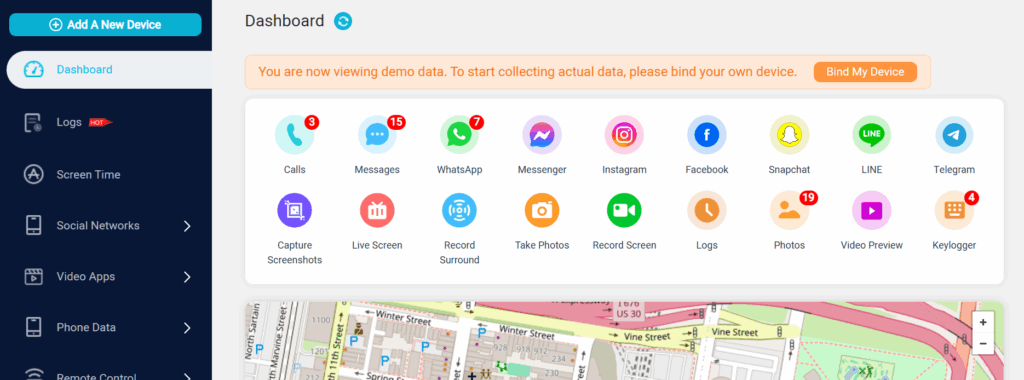
The ClevGuard parental control app is designed to help parents manage their children’s digital activities and online safety. Parents can block harmful content and receive alerts about suspicious online behavior. Their main product, KidsGuard Pro, offers features like:
- Screen-time monitoring.
- Call Logs, SMS, and Contacts tracking.
- Location history check and Wi-Fi location tracking.
- Social media activity monitoring.
- Provides remote camera access.
Key Highlights:
- Available on both iOS & Android smartphones.
- Monitor your kid’s Android from your iPhone.
- Offers a demo version to test out the ClevGuard dashboard.
- Provides remote control through an application.
- Prevent improper content exposure & gaming addiction.
Pricing:
- Yearly plan: $11.66/month
- Quarterly plan: $25.33/month
- Monthly plan: $49.99/month
Pro Tip: I would recommend getting the family plan($54.67/month) for 5 devices if you are looking for the best value for money.
Wondershare FamiSafe
Best For: Screen Time Control
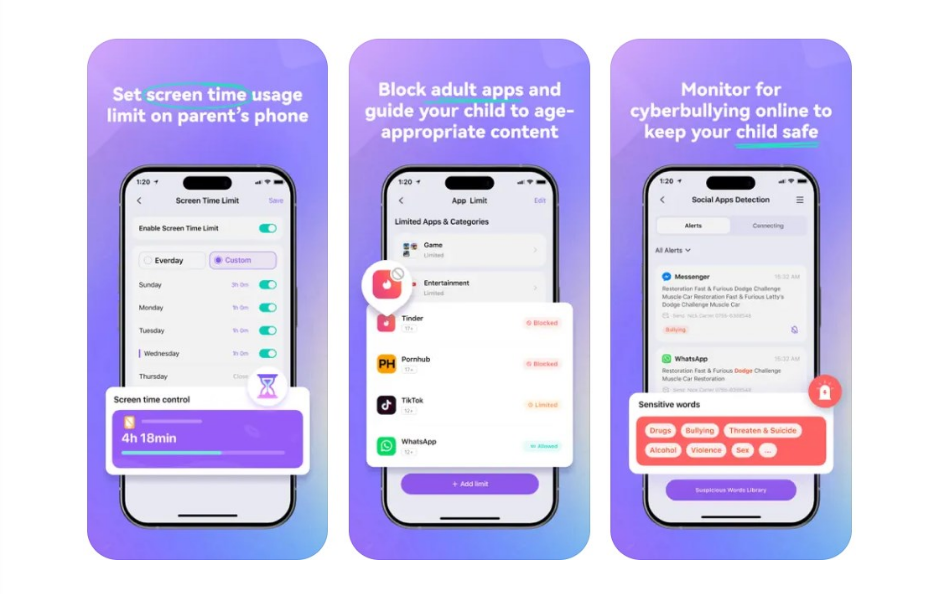
FamiSafe is a parental control app developed by Wondershare that helps parents monitor screen time, track location, and filter online content. You can set daily/weekly limits for screen-time usage. It is available for Android, iPhone, Windows, macOS, iPadOS, Amazon Fire, and Chromebook devices. Hence, this is a flexible option if your family is using multiple devices. Don’t forget to check out available deals for affordable prices.
Key Highlights:
- Easily filter through harmful websites.
- Monitor your kid’s daily browsing activities.
- Block any apps and inappropriate websites.
- Features a SOS button for listening in emergencies.
Pricing:
- Yearly plan: $4.99/month
- Quarterly plan: $6.66/month
- Monthly plan: $9.99/month
Tip: I’d suggest checking out the 3-day free trial for the Yearly plan to test out the features you want. It monitors up to 10 devices, making it a great choice for big families.
mSpy
Best For: Monitoring Online and Real World Interactions
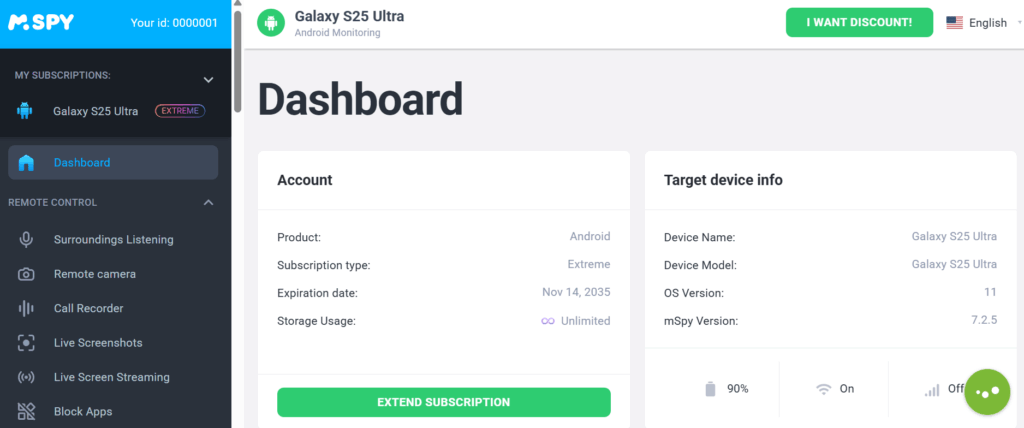
mSpy is a popular parental control and phone monitoring app designed to help parents supervise their children’s online activities. With so much short-form content available these days, phone addiction is getting more common these days. Hence, apps like these ensure your child’s online safety and limited screen time. You can check what your child is typing on AI tools like ChatGPT and Gemini.
Key Highlights:
- Monitors messaging platforms like WhatsApp, Snapchat, and text messages.
- Provides screen recording & remote screenshots.
- Provides coupons for affordable pricing.
- Block apps and websites that you don’t want.
- Keyword tracking: Sends alerts when certain keywords are typed.
- View incoming and outgoing call logs.
Pricing
- 12-month plan: $11.67/month
- 3-month plan: $28/month
- 1-month plan: $48.99/month
FamiGuard
Best For: WhatsApp Tracking
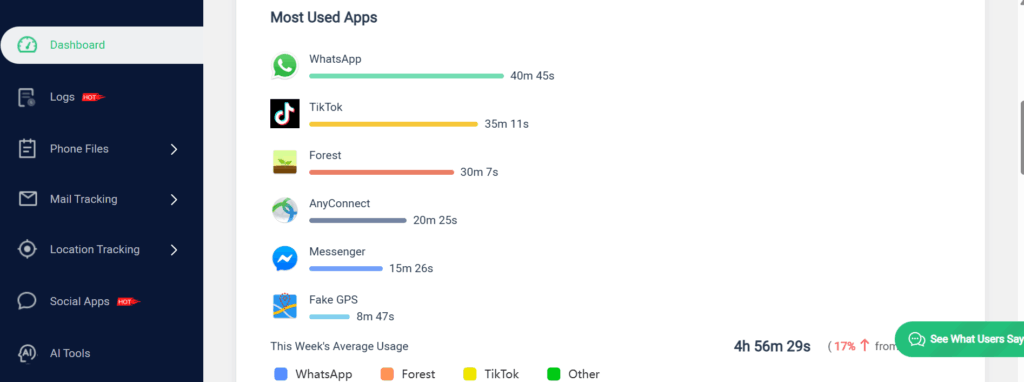
One of the major highlights of FamiGuard is its wide range of monitoring tools. It supports the monitoring of social media apps like WhatsApp, Snapchat, Instagram, Telegram, and Facebook Messenger. This gives parents peace of mind, no matter where they are. They can listen to the kid’s surroundings, including conversations.
Key Highlights:
- Social Media Monitor: Get your kid’s online watching history and the contents of their messages.
- Record Surroundings: Listen to conversations in the surrounding environment.
- Block Website: Ensure a safer online experience for your family.
- Check YouTube and TikTok history.
Pricing:
- 1 Year plan: $9.16/month
- 3 Month plan: $19.99/month
- 1 Month plan: $39.99/month
Qustodio
Best For: AI-Powered Alerts
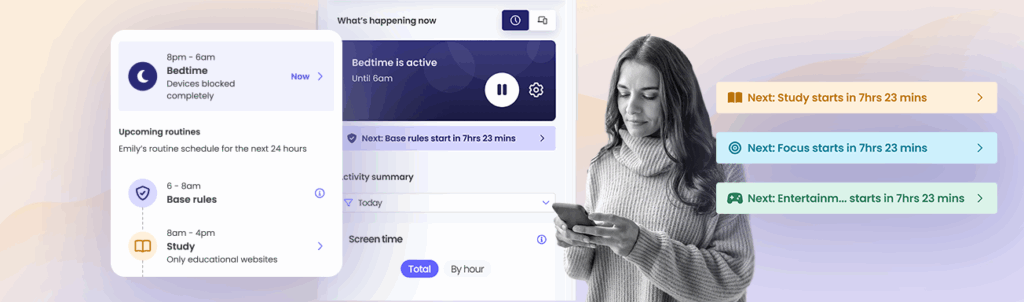
Qustodio is one of the most popular parental control apps designed to help families manage screen time and monitor online activity. These help you create safer digital habits for children on any devices. It supports major Operating Systems, including ChromeOS. It also provides advanced tools on supported devices. This includes call and SMS tracking and app usage reports.
Note: You will have to activate this app on your kid’s device also to start using it.
Key Highlights:
- Get activity reports and insights.
- Supports: Android, iPhone, Windows, macOS, Chromebook, and Kindle devices.
- Al alerts: Helps you detect risky searches or content.
- Set time limits: This feature helps your kids manage their time online.
Pricing:
- Basic plan: $59.95/year
- Complete plan: $109.95/year(supports unlimited devices)
Priority phone support: You can get the ‘Add Care Plus’ add-on for $12.99 if you want priority phone support.
Eyezy
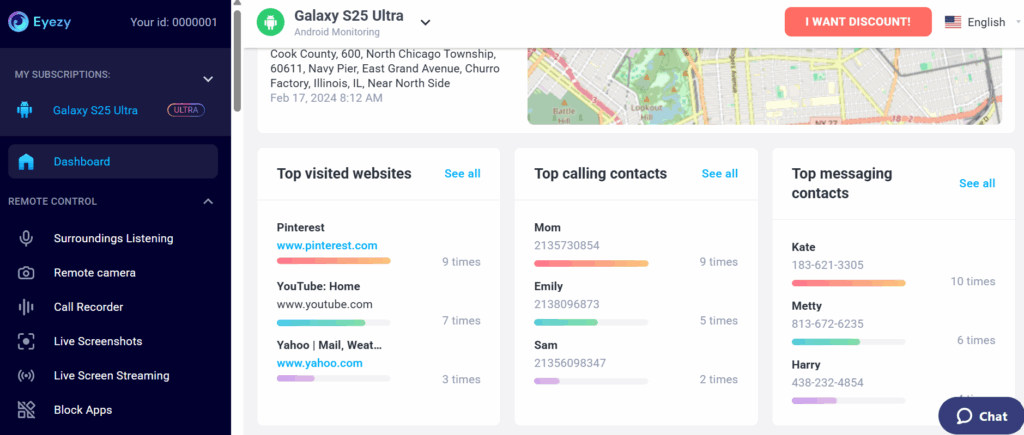
Similar to the apps discussed above, the Eyezy parental control app is also a phone monitoring platform. Parents can create safe zones using geofencing, which notifies them when they leave the virtual safe zones. One can also receive alerts about suspicious keywords through a centralized dashboard. The Social Spotlight features include screen capture, monitoring text messages, WhatsApp, and Snapchat messages.
You can look for stats such as Top Visited Websites, Top Calling Contacts, and Top messaging contacts on the dashboard.
Key Highlights:
- Keylogger: This feature records every keystroke typed on your child’s device.
- Call Logs, SMS, and Contacts tracking.
- The Keystroke feature is available for both Android and iOS.
- Photos, Videos & Files access.
Pricing:
- 12 Month plan: $7.99/month
- 3 Months plan: $22.39/month
- 1 Month plan: $38.39/month
uMobix
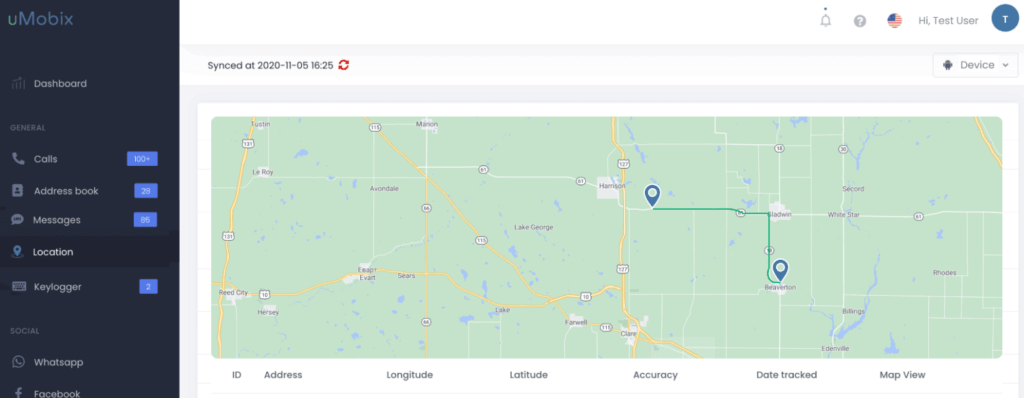
uMobix is a robust cell phone monitoring tool marketed primarily for parents. It emphasizes real-time tracking and deep visibility into social media, messaging, and device activity. It functions more as a monitoring app like mSpy and ClevGuard. The stealth mode allows it to run silently in the background of a target device. Although the yearly plan is affordable, it lacks screen-time scheduling,
Key Highlights:
- Provides real-time GPS Location Tracking.
- Works on both Android and iOS devices.
- Features iOS monitoring via iCloud.
- Monitor activity on Instagram, Snapchat, & other social media apps.
Pricing:
- Yearly plan: $12.49/month
- 3 Month plan: $29.99/month
- 1 Month plan: $49.99/month
Google Family Link
Best For: Families who use Google Services
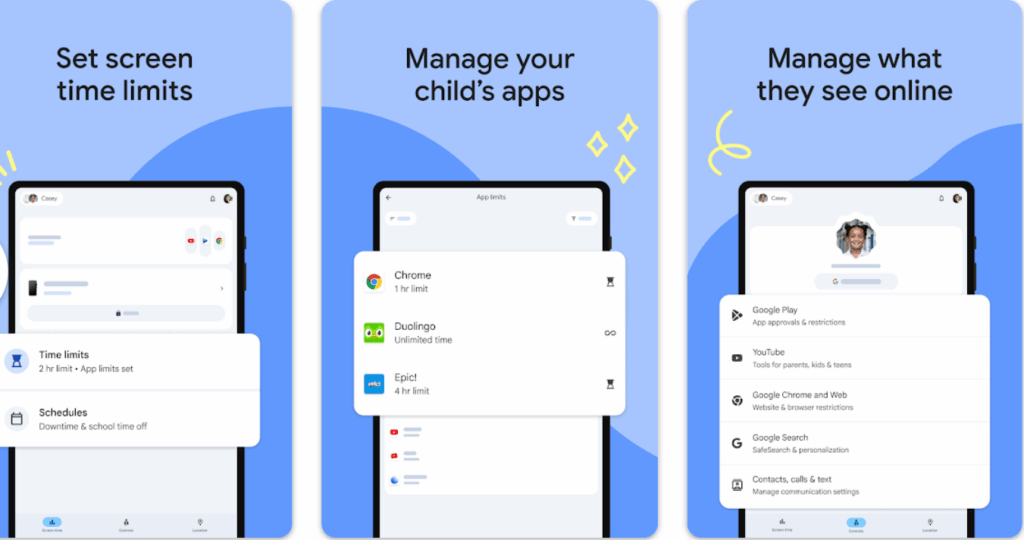
Google Family Link is Google’s official, completely free parental control solution. It is one of the most popular options for Android families because it integrates seamlessly with Google services (Play Store, Chrome, YouTube, etc.). It is the best option if you’re looking for a simple and free monitoring software without any advanced tools.
Key Highlights:
- Screen Time Management: Daily limits and app-specific time limits.
- Real-time Location Tracking: Monitor your child’s device location.
- Get activity reports for app usage and screen time.
- Filter content using SafeSearch to avoid inappropriate content.
Pricing: Free
Aura
Best For: Family Identity Protection
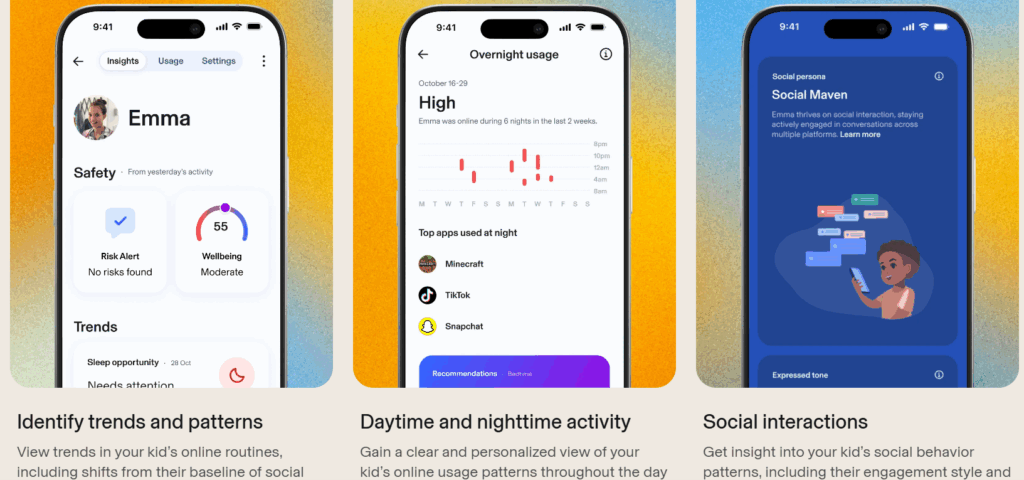
Aura offers strong parental controls along with identity theft protection, antivirus, and VPN for the whole family. The screen-time management allows you to set daily limits on specific apps. It stands out for its focus on the prevention of threats like viruses and malware.
Key Highlights:
- Features AI-powered detection in messages and social media.
- App Monitoring & Blocking: Approve or block unwanted apps easily
- You can get activity reports and social interaction summaries.
- Great for families looking for cybersecurity and parental control features.
Pricing:
- Kids plan: $10/month
- Family plan: $32/month
Bark App
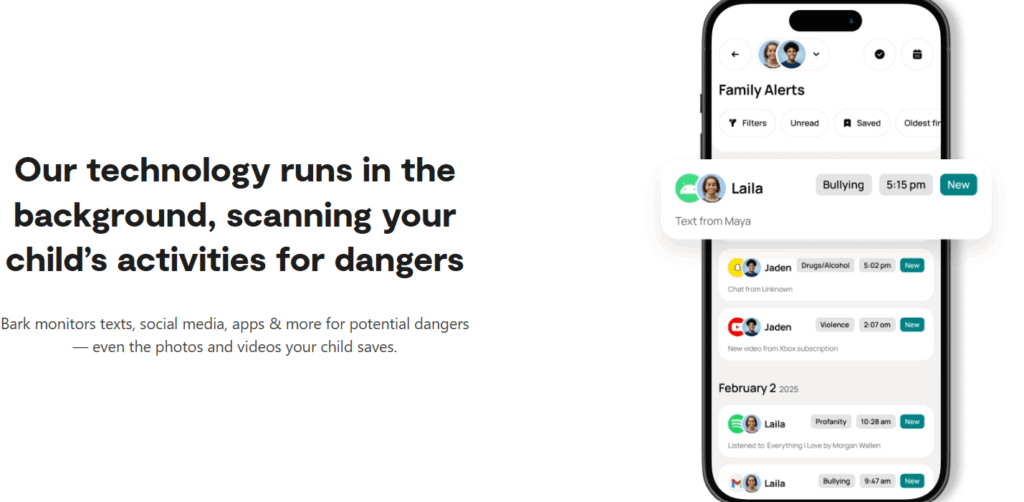
Bark is a leading AI-powered parental control and monitoring app. It uses advanced AI to scan texts, emails, YouTube, and web activity, then sends alerts when it detects potential risks like cyberbullying. The AI content monitoring feature Scans texts, emails, and images on social media apps. Apart from the app, they also sell Bark smartphones and watches with built-in monitoring features.
Key Highlights:
- The app monitors texts, email, YouTube, and 30+ apps & platforms.
- Real-time GPS Location Tracking.
- Allows you to block inappropriate sites and applications.
- The Bark Jr plan is limited to basic screen time management.
Pricing:
- Bark Premium: $14/month
- Bark Jr: $5/month
Final Thoughts
Applications like these are important for keeping your child safe online while teaching responsible habits. Make sure you consider your child’s age and do your own homework before investing in these apps. It is also important to remember that no app can fully replace open communication and digital education within the family. Always make sure to check for free trials and demos to select the best app for your child’s needs.