
Everyone in their video editing journey first thought that one tool would be enough. This is what most get wrong, as everyone’s editing needs are different. Someone is looking for editing cinematic-style videos, while someone just needs a quick edit of a family vacation video.
Like anything in life, there is no perfect tool for everyone. Factors like budget, your device specs, and the purpose of editing help you decide the best video editing software for you.
Filmora
Best for: Advanced Editing with AI Features
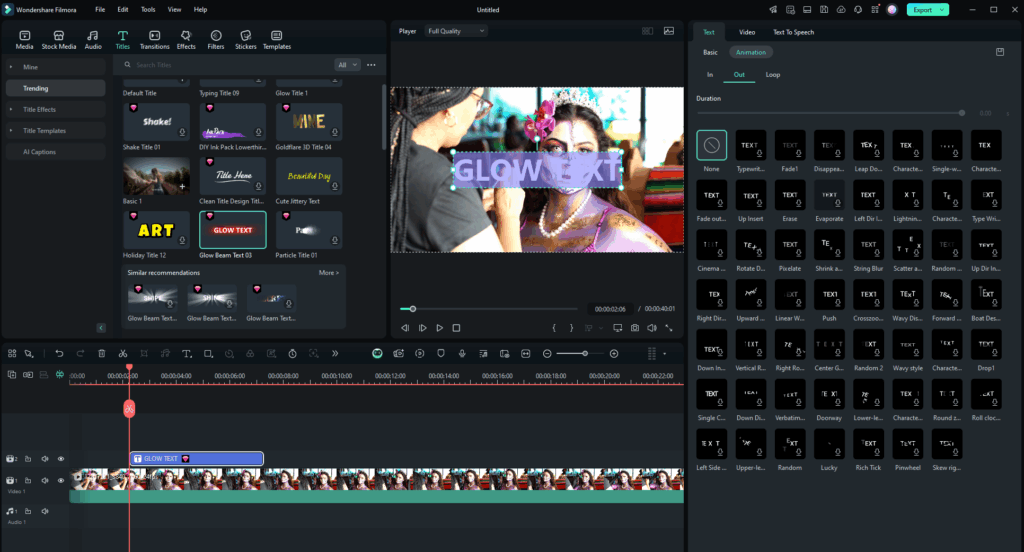
Filmora has been creating a buzz in the editing industry lately. With their generative AI features, you can now create videos using prompts in the tool itself. It is designed for creators who want professional-looking videos without a steep learning curve. Many creators who have just started vlogging prefer this tool over others.
Highlights:
- It is suited for beginners and experienced editors also.
- AI-Video Enhancer: It improves the video resolution and overall lighting.
- The drag-and-drop features make editing easy without needing technical knowledge.
- It allows 4K export support with multiple formats.
- Offers coupons for affordable pricing.
- Provides ready-to-use templates that save time.
- AI Mate provides a suite of AI video editing features.
Pricing(For Individuals):
- Basic plan: $9.99/year
- Advanced plan: $34.99/year
- Perpetual plan: $49.99/year(A One-Time Payment)
Movavi
Best for: Beginners and Intermediate Users
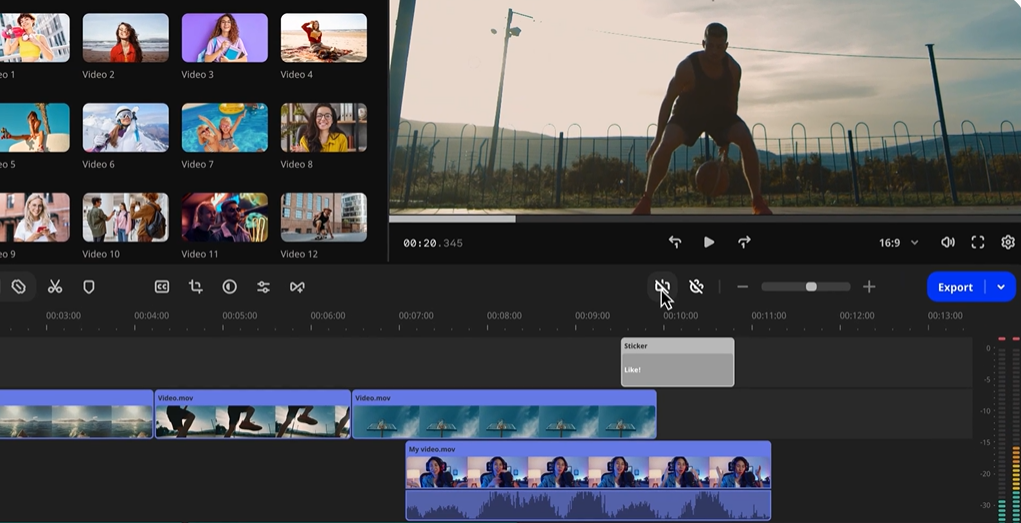
Compared to Filmora, Movavi offers a plain video editing interface, making it perfect for beginners. Video editors who are in the learning phase can use it to quickly edit content. Importing audio and video files into the timeline is relatively easy. You can see the media available for import on the left side above the main timeline. On the other hand, the preview is visible on the right side.
Highlights:
- Features 6000+ effects in Movavi Effects.
- AI background removal: Removes any background from your videos.
- AI background noise removal eliminates ambient sound to enhance the video quality.
- Provides filters, color correction, and motion tracking.
- Offers a 14-day money-back guarantee on your purchase.
Pricing(Lifetime Access):
- Video Editor: ₹2,699
- Video Editor Plus: ₹3,199
- Video Suite: ₹3,590
Pinnacle Studio
Best for: Editors using Windows Workstations
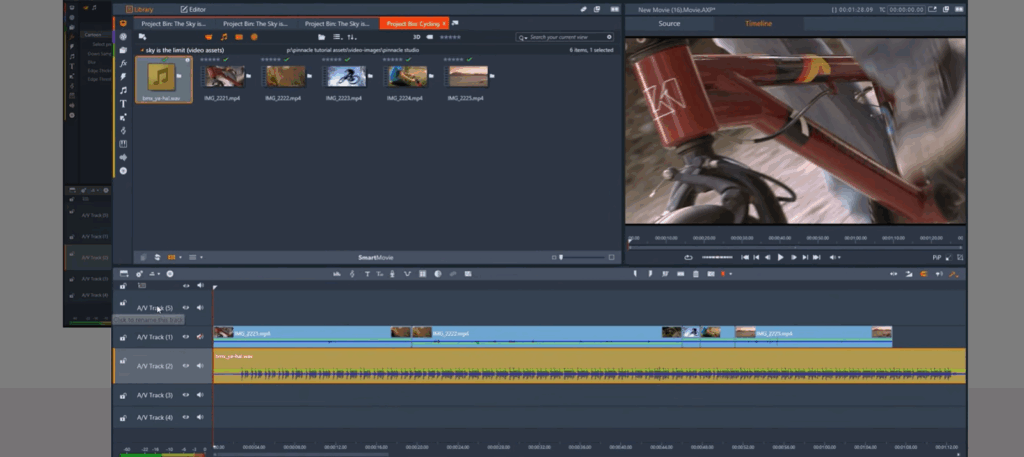
Developed by Pinnacle Systems, Pinnacle Studio is a video editor for Windows users. I would recommend using Pinnacle Studio for YouTube content such as generic travel vlogging. People with even a bit of editing experience can find their way around the tool.
What really stands out is its one-time pricing model, which is becoming rare. For users who plan to edit regularly, this can be more cost-effective than monthly subscriptions. They also offer an Ultimate studio bundle for $99 for those looking for a complete package.
Highlights:
- Offers screen recording support with video masking capability.
- Suited for marketing agencies looking for a cost-effective option.
- Blend modes allow creative compositing, such as adding lights or creating textures.
- Keyframing for detailed animation control.
- Their one-time payment model helps you save money over time.
Pricing(One-Time Purchase):
- Pinnacle Studio: $29.99
- Pinnacle Studio Ultimate: $79.99
- Pinnacle Studio Ultimate Bundle: $99.99
VideoProc Vlogger
Best for: Hobbyists and Casual Content Creators
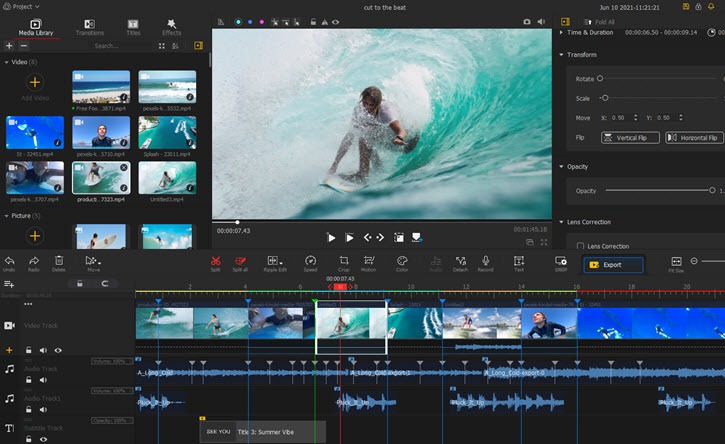
The VideoProc Vlogger is a dedicated video editing tool. On the other hand, VideoProc Converter AI combines video processing features along with video editing tools. The editing tool boosts the performance by utilizing full-level hardware acceleration. Although it is not built for teams and organizations, it does a good job on YouTube videos, Instagram reels, and personal projects.
Highlights:
- Offers advanced color grading and correction tools.
- Multi-track timeline editing (like professional software)
- Speed ramping and motion editing for cinematic effects.
Pricing:
- Premium 365: $34.95 (1-Year Subscription)
- Lifetime License: $54.95 (Forever Access)
- Family License: $79.95 (Forever Access on 3-5 PCs)
VideoStudio
Best for: Editors Working With Live Events and Concerts
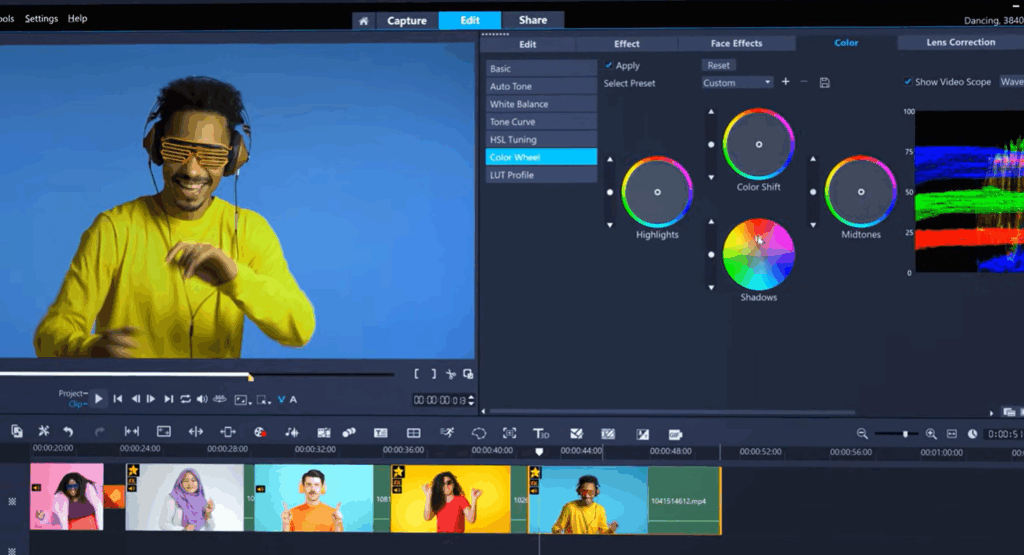
One of the major highlights of VideoStudio is its MultiCam editor. It is a video production technique that synchronizes footage from multiple cameras recording the same scenes simultaneously. This is beneficial for creatives who work with live events and concerts. It allows them to capture performances from multiple angles and sync them in real time. That allows you to create an entertaining video that audiences engage with.
Highlights:
- 4K, 8K, and 360° video editing support.
- VideoStudio Pro features 4 cameras for multi-cam editors.
- VideoStudio Ultimate provides 6 cameras
- Features a built-in GIF creator in the editing tool.
- 4K, 8K, and 360° video editing support
Pricing:
- VideoStudio Pro: ₹6,470 (One-Time Purchase)
- VideoStudio Ultimate: ₹8,100 (One-Time Purchase)
AVS4YOU
Best for: Video Editors Looking for the Best Budget Alternative
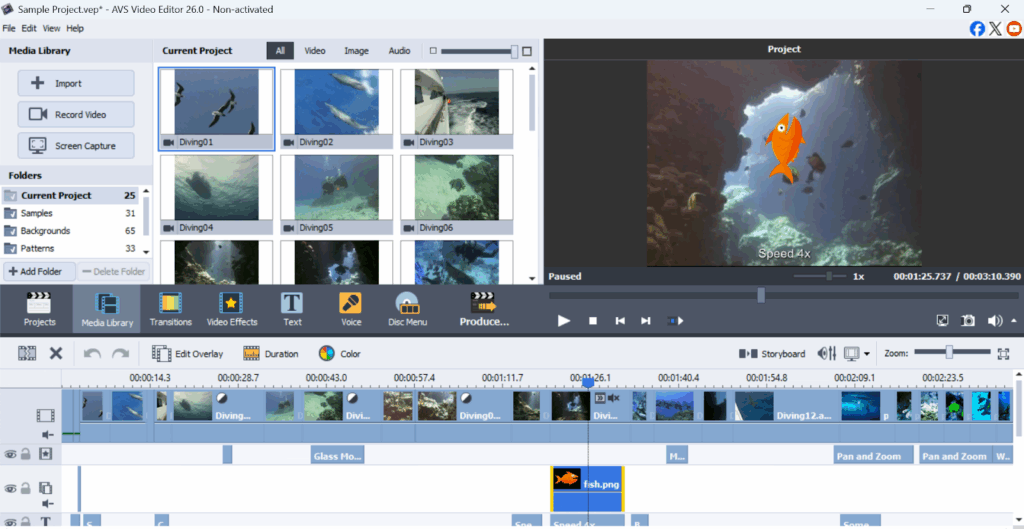
This video editor is among the big suite of tools that AVS4YOU offers. The AVS4YOU video editor provides the most value for money. This is why it is popular among the budget-conscious shoppers. Its intuitive user interface makes it easy for beginners to navigate. It is best for users who want to make simple edits without hassle. They can add simple effects and transitions without spending much time.
Highlights:
- The software is easy to download after purchasing the license.
- It is not trying to compete with advanced tools like DaVinci Resolve and offers simple features.
- It is popular for being a “utility first” video editor rather than an all-in-one tool.
- Easy to apply transitions.
Pricing:
- 1 Year Subscription: $49
- Unlimited Subscription: $79 (Lifetime access)
Pictory
Best for: AI Video Editing Features
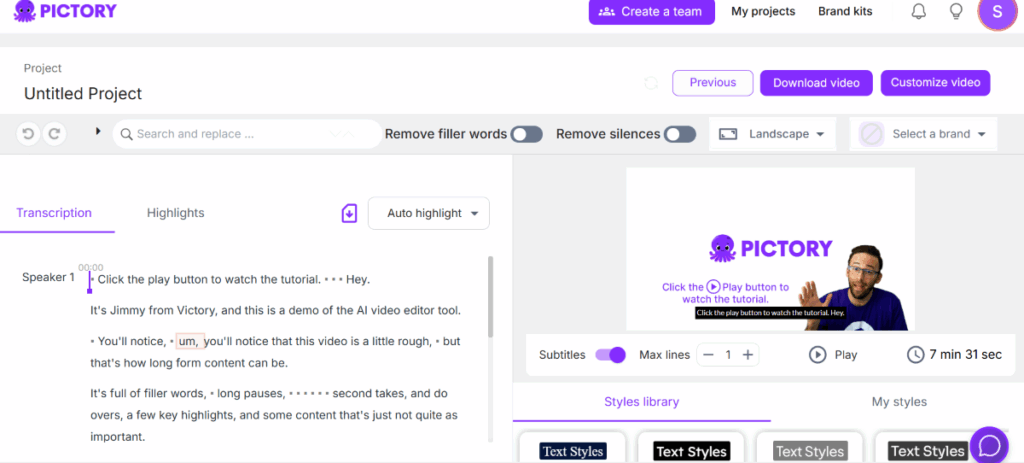
Pictory is not a conventional video editing tool as it integrates AI features into it. To use its editing features, all you have to do is select AI Video Editor from the dashboard. It acts as an all-in-one creative solution. Picture has a wide collection of fonts, music, and AI voices to use in your project. This eliminates the need to record VO or use other tools for creative assets.
Highlights:
- Easy to turn text into engaging videos.
- The videos can be edited to add AI voice-overs and music.
- Useful for marketers scaling content production.
- Great for creating Instagram ads and YouTube ads.
- Built for non-tech-savvy editors.
Pricing:
- Starter plan: ₹1,599/month
- Professional plan: ₹2,499/month
- Team plan: ₹8,399/month
- Enterprise plan: Custom pricing
LUXEA by ACDSee
Best for: Editing Social Media Videos and Tutorials
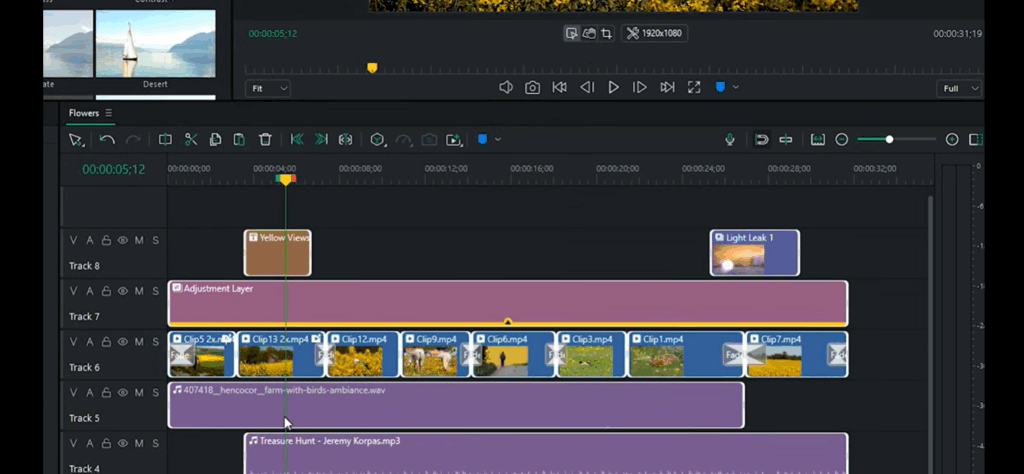
LUXEA is a video editor provided by ACDSee. It is one of the most underrated video editing software out there. The tool is designed for making quick social media edits. Some editing software is limited to 2 tracks. With its multi-track editing, users can add multiple video and audio files to the project timeline.
Highlights:
- Features a traditional multi-track timeline.
- Drag and drop editing features.
- Offers basic audio editing tools and color correction tools.
- Provides a real-time preview for better track editing and improved workflow.
Pricing:
- Individual Plan: $49.99/year
- Lifetime License: $29.95 (Forever Access)
- 365 Home Plan: $89/year
VSDC
Best for: Video Editors with Low-End PCs
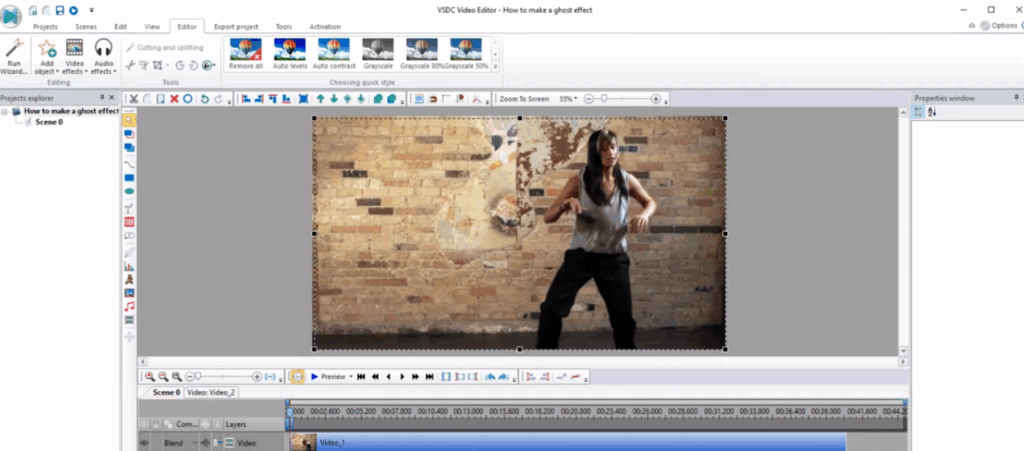
The simple editing interface makes it easy to use for beginners. It works smoothly on low-end PCs as it does not consume too many resources. The tool provides motion-tracking, masking, non-linear editing, and other advanced features. It supports 4K, 2K, and high frame rate exports. VSDC offers a pro version and a free version for users.
The free version lacks advanced masking tools and video stabilization. Therefore, it is better to go with the Pro version.
Highlights:
- 4K editing and exports.
- Color correction (LUTs/wheels).
- The Chroma Key tool removes blue/green backgrounds.
- The Pro versions offer faster rendering and advanced masking.
- The lightweight resources allow it to run on older PCs without sacrificing quality.
Pricing:
- VSDC Video Editor Pro: ₹ 3,312.96 (Lifetime Access)
Final Thoughts
Video editing software doesn’t just vary in features, but also requires different resources. Some editing tools run on any device, while others require higher RAM, CPU power, and GPUs. Complex multi-track editing and generative AI features often demand most of the resources. Tools like Filmora demand 4GB-8GB RAM minimum and 2GB of VRAM. No matter the tool, it is important to have SSDs to prevent sluggish performance. Simpler editing features, on the other hand, don’t need much and can operate on(almost) any PC.